Guide
Choosing the right kind of listing
What the New listing page offers, which choice fits what you're selling, and why some choices don't appear for every animal.
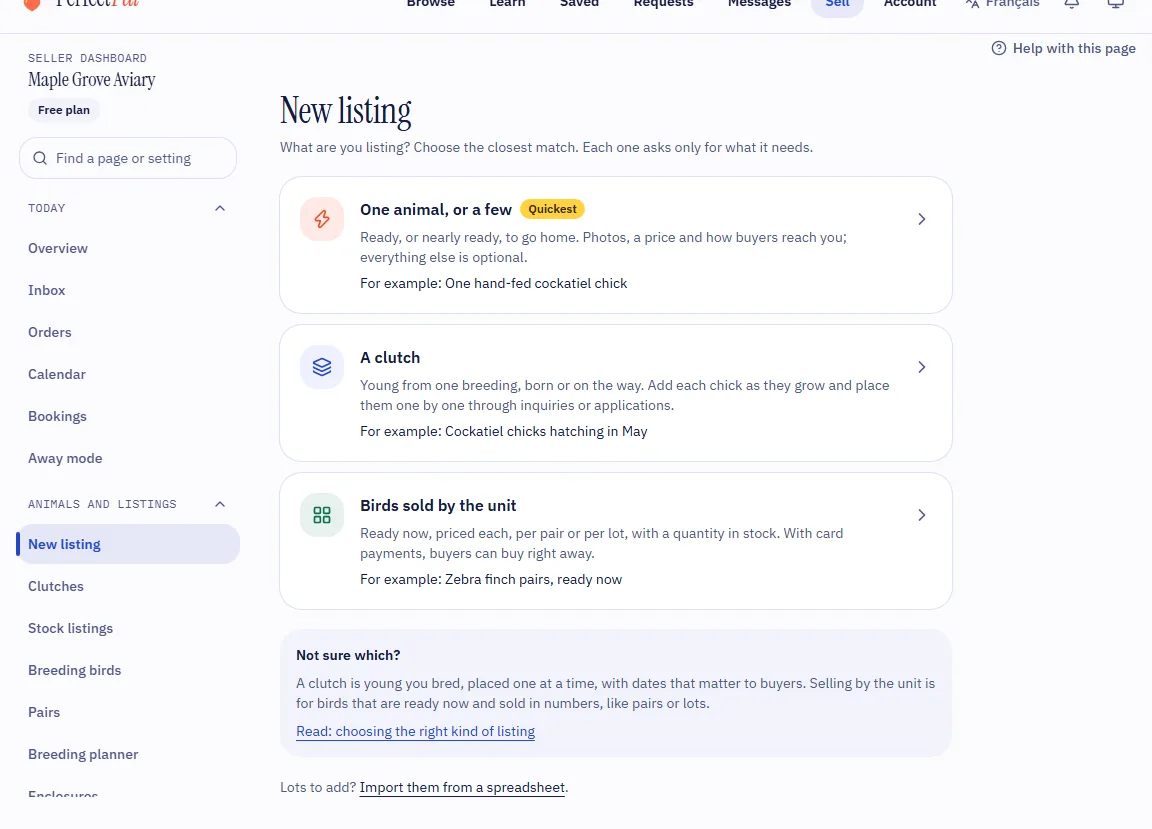
Every listing starts in the same place: Animals and listings › New listing in the dashboard menu, or the New listing button on your dashboard's overview. The page asks What are you listing? and offers up to four choices, each with a line saying what it's for and an example from the animals you raise. Choose the closest match: each one asks only for what it needs.
The choices
One animal, or a few
Marked Quickest. For animals that are ready, or nearly ready, to go home: photos, a price and how buyers reach you, and everything else is optional. For example one hand-fed cockatiel chick, a Ragdoll kitten ready to go home, or a hammer coral frag. See "The quick way" below.
A group of young
Named for your animals: A clutch, A litter or A spawn (or A group of young when your animals use different words). Young from one breeding, born or on the way: you add each animal as they grow and place them one by one through inquiries or applications. Buyers can follow a group from the moment it's planned. For example cockatiel chicks hatching in May, or a litter of Labrador puppies due in the spring. See List a group of young.
Sold by the unit
Named for your animals, such as Birds sold by the unit or Coral frags sold by the unit. Animals that are ready now, priced each, per pair or per lot, with a quantity in stock. With card payments, buyers can Buy now and pay straight away. For example zebra finch pairs, cherry shrimp sold by the dozen or zoanthid frags. See Create a stock listing.
An animal that needs a new home
For rescue organisations: one animal per listing. See Rescue listings.
Why some choices don't appear
The page shows only the choices the animals on your profile allow:
- Cats, dogs, reptiles and small animals are listed as groups of young, so there's no "sold by the unit" choice for them.
- Corals are sold by the unit only.
- Birds depend on the species: some, often sold in numbers, can be listed either way; the rest are listed as clutches.
- Fish and other aquatic animals, freshwater or saltwater, can be listed either way.
- A part you switched off in Settings › Customize dashboard (groups of young or stock listings) isn't offered either. Switch it back on there to see it again.
- An animal that needs a new home shows only for rescue organisations.
When both a group of young and selling by the unit are offered, a Not sure which? box under the choices sums up the difference and links here. If you have lots of animals to add by the unit, Import them from a spreadsheet, under the choices, adds them all at once: see Quantity, stock and editing many listings.
The quick way
One animal, or a few is the shortest way to a listing.
- Choose the species. If you raise only one, this step is skipped.
- The page says in one line what kind of listing it will be, chosen from the species: for example "Listed as a clutch, so buyers can ask about or apply for each chick", or "Listed for sale by the unit". Where the species can be listed either way, a link beside it switches (Sell by the unit instead, or List as a clutch instead). Change picks another species.
- Fill in the essentials. As a group of young: How many (the field says how many you can add at once), Price each, Ready to go home (Now or From a date), How buyers reach you and Photos. Sold by the unit: how many, Sold per, Price per unit, How buyers reach you and Photos. Anything your animals require is asked too, such as All birds are weaned for birds.
- More details holds the rest, all optional: dates and details, a deposit, the parents, a title and description, a video, and a day to publish it later.
- Choose Create listing.
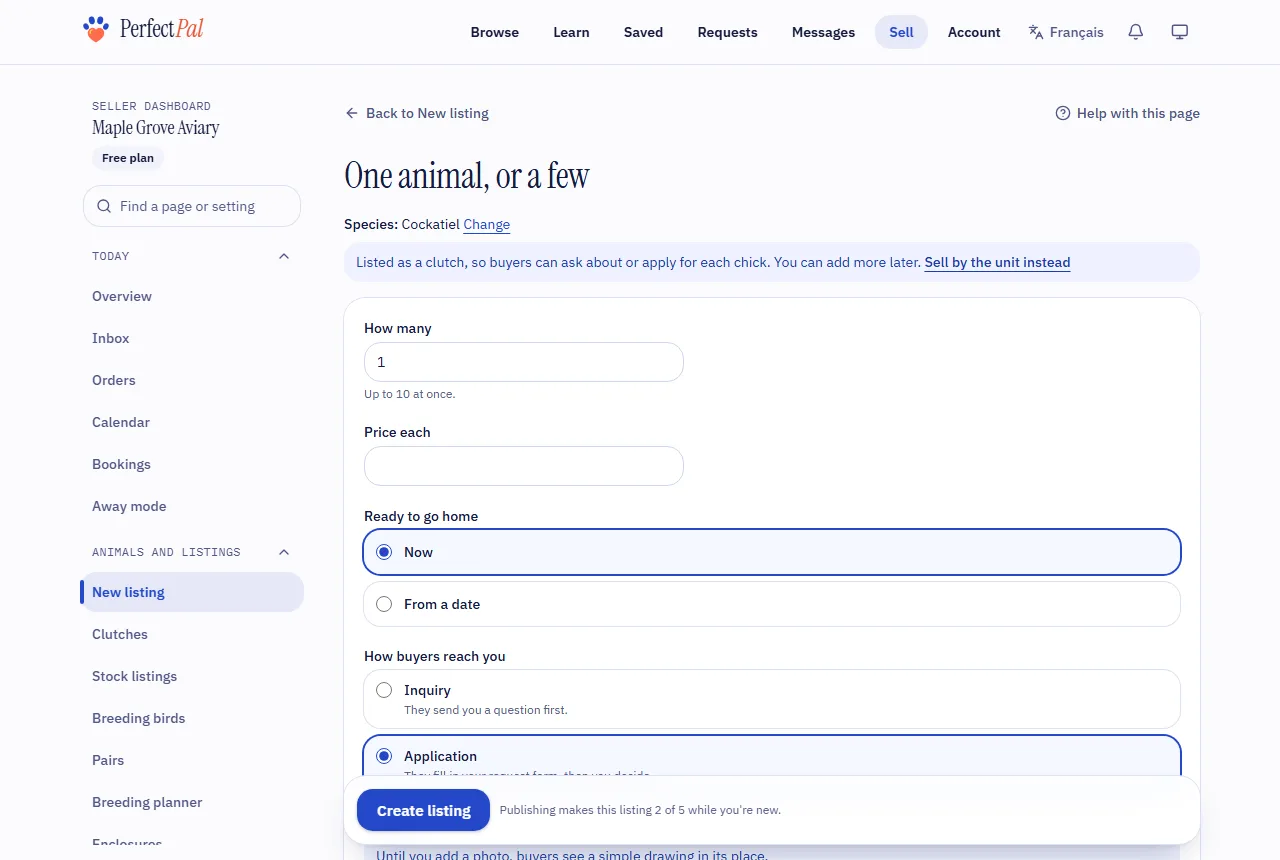
What you get is an ordinary listing of that kind:
- As a group of young, PerfectPal creates the group with a record for each animal, named with your animals' word and a number in the language you write in ("Chick 1", "Chick 2"…). Rename, edit, reserve and mark each one gone home like any other: see List a group of young. You can add more animals to the group later.
- Sold by the unit, it's a stock listing with that quantity: see Create a stock listing.
Which one to choose
- One animal, or a few when they're ready now or soon and you want the listing up quickly. You can fill in the rest later.
- A group of young when you're planning a breeding or young are on the way, the dates matter to buyers (when they're expected, born or hatched, and ready to go home), and you choose a home for each animal through requests. Deposits, contracts and the gone home photo are always available on its requests.
- Sold by the unit when you sell the same kind of animal in numbers, by the unit, the pair or the lot, and keep a count of how many you have. It's the only kind that can take Buy now orders.
Not sure how buyers should reach you? See Buy now, inquiry or application?. For what to put in the listing, see What a good first listing looks like.
Tip: A listing keeps its kind once it's created. If you chose the wrong one, create the listing again with the right choice, then close or delete the first: see Close or delete a listing.
Updated October 25, 2026
Was this helpful?
Still need help?
PerfectPal staff read every message. Tell us what you were trying to do and what happened.
- What a good first listing looks likePhotos, a clear title, the price, a description, the details buyers ask about and how the animal goes home, so the right buyer can say yes.
- Buy now, inquiry or application?The three ways buyers can reach you from a listing, and what each one switches on.
- Photos and videos on listingsHow many you can add, what happens to them, and how videos are converted.
- Quantity, stock and editing many listingsHow quantity drives availability, what buyers see during checkout, and how to edit or import many listings at once.
- "Still available?" emails and paused listingsWhy PerfectPal asks whether an untouched listing is still available, and what happens if you don't answer.