Tutorial
Ask for a deposit or payment
Send a payment request on a request, with your refund terms, and see when it's paid.
On a request, you ask the buyer for money with a payment request. They pay by card (if you've connected Stripe), or pay you another way and you record it.
Steps
- Open the request in Today › Inbox. You usually approve or match it first.
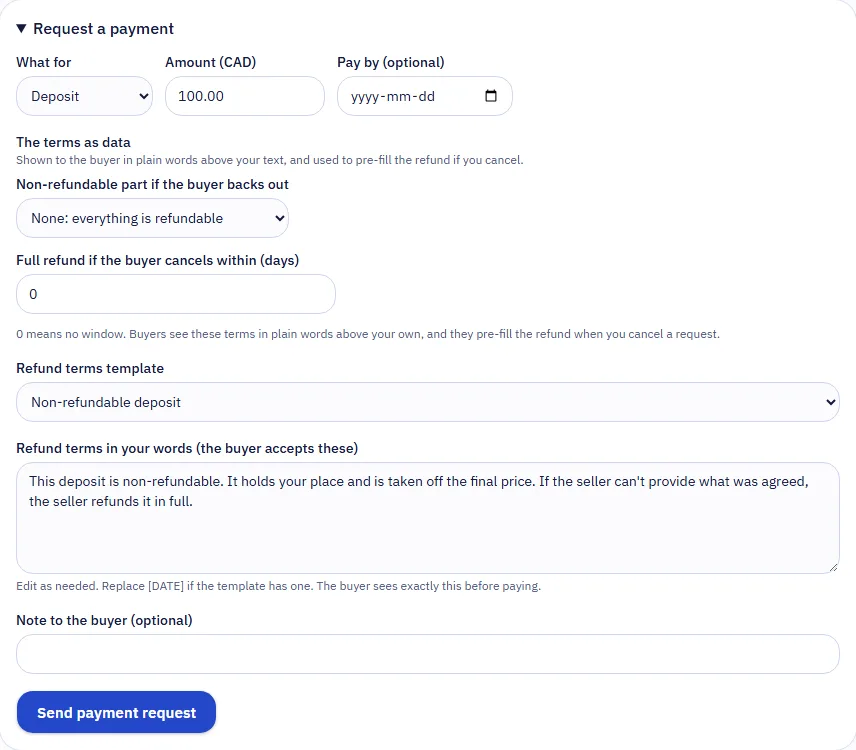
- Under Payments, choose Request a payment.
- Choose What for: Deposit, Balance, Full payment or Other payment, and the Amount. If a go-home plan with a trip cost was agreed, you can add it as its own line (PerfectPal's fee doesn't apply to it).
- Optionally set Pay by, a date for the buyer.
- Check the refund terms. They start from your defaults; change them for this request if you need to. The buyer reads and accepts exactly these before paying. See Refund terms.
- Add a note if you like, then choose Send payment request.
The buyer is emailed and sees Pay securely on their request, with the total, including any PerfectPal fee on their side, before they pay.
After they pay
- The request shows Paid, and a deposit request moves the request to Deposit paid by itself.
- You're emailed a receipt, and the payment appears under Money › Payments.
- Whether a deposit, balance or full payment counts toward the price is worked out from the payments themselves: the request shows "Paid" or "Paid in full".
If they pay you another way
Choose Record as paid outside PerfectPal, then Yes, the buyer paid me directly. The buyer is asked to confirm. Recorded payments carry no PerfectPal fee.
Things that can hold a payment
- You've asked buyers for a verified phone or ID check before their first payment.
- You ask buyers to sign your contract before a deposit. See Contracts.
- On stock listings, deposits must be switched on for the listing.
Team members need the orders area to ask for money.
Updated October 19, 2026
Was this helpful?
Still need help?
PerfectPal staff read every message. Tell us what you were trying to do and what happened.
- Refund termsSay what you keep if a buyer backs out, in plain terms buyers accept before paying.
- Refund a paymentRefund all or part of a card payment on a request or an order, and what happens to the fees.
- PerfectPal's feesHow PerfectPal's fees on card payments work, who pays them, and where to see the current amounts.
- Let buyers pay in fullLet buyers pay the whole price by card themselves once you've approved or matched their request.
- Ask buyers for a phone or ID check before they payRequire a verified phone, or an ID checked by PerfectPal, before a buyer's first card payment on a request.